A corner of the book is torn after years of storage, the assembly manual is missing somewhere after a house move, or you just scored a used old model kit (2nd hand) that doesn’t come with the instructions... all of which forces the assembly process to be paused.
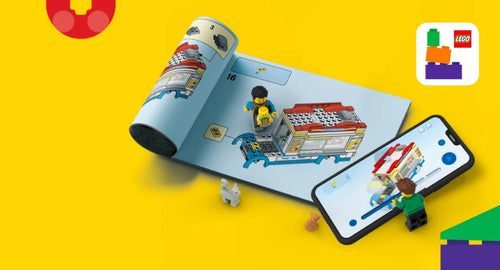
Don’t worry too much, how to find LEGO building instructions when the book is lost is actually very quick. LEGO currently offers free digital instruction documents for thousands of product sets, helping you easily download the PDF file to your device or follow each visual step directly on your phone or tablet.
Identify the LEGO set number - The first step before looking it up
To find the right documentation, the most important information you need is the LEGO Set Number. This identifying sequence usually consists of 4 to 7 digits, printed prominently on the front or the sides of the box, and it also appears on the purchase receipt and the product information page online.
If you have discarded the box and don’t remember the number, you can apply the step-by-step process below:
-
Check order history: Find the order confirmation email or purchase history in the Mykingdom store/website system.
-
Find old images: Review photos of the box, display corner, or models saved in your photo collection on your phone.
-
Narrow by theme and year: Recall the product line you’re playing (such as LEGO City, Ninjago, Technic, Speed Champions or Icons) and the estimated release year to look up the catalog.
-
Cross-check with distinctive characters or parts: Use photos of exclusive Minifigure characters or special bricks to search via Google Lens, then narrow down and identify the exact corresponding product set number.

How to find LEGO building instructions when the book is lost via LEGO website
When you need a complete document to view on a large screen or print out for on-the-table reference, LEGO’s customer service page is the optimal choice. Here, you can download official LEGO PDF instructions completely free by following these steps:
Step 1: Visit LEGO’s official support portal at: lego.com/service/buildinginstructions.
Step 2: Enter the product’s set number into the search bar to find the LEGO book by set number. If you’re not sure of the number, you can enter keywords of the model name, choose the theme and estimated release year to filter results.

Step 3: Choose the set of documents to use. Large, detail-rich sets are often divided into multiple volumes (Book 1, Book 2...) or have different update versions.

Step 4: Click the Download PDF button to save the file directly to your computer or mobile device.

Note:
-
Although LEGO’s digital archive is vast, not every product released in history has a digital scan available on the website.
-
For sets with large file sizes (such as Technic or Icons lines), you should prioritize downloading the individual volumes you are working on and save them to your device rather than viewing directly in the browser, to ensure smooth page turns and avoid connection issues.
Visual assembly with greater clarity using the LEGO Builder app
For models with a lot of technical detail, flat paper manuals can sometimes be confusing in occluded assembly angles.
At this time, using the LEGO Builder guide directly in the official app will be a highly effective aid thanks to its multi-dimensional spatial interaction capabilities:
-
View the model in flexible 3D: For compatible sets, the app lets players freely rotate 360 degrees, zoom in and out on each detail to clearly observe how the pegs, gears, or axles fit together.
-
Build Together mode: The feature splits assembly steps so that friends or family members on multiple devices can collaborate to complete a large model on separate devices (Note: This feature is only available for some sets).
-
Digital collection storage: Helps players manage the catalog of all LEGO sets they own on the app’s virtual bookshelf (via a LEGO Account).

Quick tips:
You can download the LEGO Builder app for free on the App Store or Google Play.

After opening the app, enter the LEGO set number into the search bar (or scan the QR code on the cover if the book cover is torn but not completely lost), then choose the 3D view or the PDF view depending on your needs to start assembling.

Find documentation for old LEGO sets or rare editions
If you’ve already checked LEGO’s official website but can’t find documentation (common with classic sets that stopped production decades ago), you can seek help from data archives maintained by the international community of players:
-
Brickset.com: A vast and highly reputable LEGO database. On the detail page for each model, simply select the "Instructions" tab to view links to community-contributed archived documents.
-
Peeron.com: An open library that stores scans of the paper instruction books for LEGO sets from the 1980s–1990s. Although the interface has a traditional archival feel and coverage is limited, it remains a valuable lifeline for classic product lines.
-
Rebrickable.com: A useful platform to check the catalog of individual bricks in a set. In addition to aggregating build instruction links, this site also suggests thousands of ways to repurpose old bricks into entirely new, creative models (MOC).
Operational tip: When visiting the above community websites, you only need to enter the exact LEGO set number into the search bar to go directly to the set’s information page without needing to read too much specialized English.
A few notes when using electronic documentation and printing
Protecting your eyesight while viewing on screens
When viewing instructions on your phone or tablet for extended periods, you should balance the screen brightness with the room lighting, place the device on a stand at eye level, and actively give your eyes a rest after every 45–60 minutes of focus.

Tips for printing PDFs at home
-
Choose the Fit to page (or Fit to Printable Area) option in the print settings so the entire frame and page count are not cropped by the edges of A4 paper.
-
Because LEGO instruction books typically have from dozens to hundreds of pages, you should print double-sided or only print the pages you’re currently assembling to save paper and ink.
-
For steps with many dark color tones that can be tricky (such as black, dark gray, navy blue), print a sample page to check contrast and clarity before full-scale printing.
Storing the original paper book for new sets
As soon as you open a new LEGO set, you can store the paper book in a file folder or a resealable zip bag. This simple method helps prevent the pages from warping, yellowing, or mold due to weather, while preserving the collectible value of the model for the long term.

Frequently asked questions when finding the instruction book
Is downloading LEGO instruction PDFs from LEGO cost-free?
No. All digital instruction documents released by LEGO on the customer service page are completely free to download.
Can the LEGO Builder app be used offline?
Offline availability depends on the set and how much data you have downloaded beforehand. To ensure the assembly process isn’t interrupted, you should open the app and pre-download the instruction content for the model while you have a stable Internet connection.

Once you’ve mastered how to find LEGO building instructions when the book is lost, losing the paper notebook will no longer be a barrier to completing your favorite creation. With timely support from LEGO’s official digital tools, just a few simple steps, your building desk is ready for focused, exciting hours.
If you’re seeking new building challenges to upgrade your display corner or expand your collection, visit the nearest Mykingdom store system or visit the website. Thousands of official LEGO sets with diverse themes from LEGO Speed Champions, Technic, Icons to LEGO City and Ninjago await you to explore and conquer!
Source: LEGO
See more
Can LEGO DUPLO be assembled together with LEGO Classic?
Share tips on preserving and cleaning LEGO toys to keep them looking like new
LEGO Build Together: The whole family learns, the whole family plays